> ## Documentation Index
> Fetch the complete documentation index at: https://docs-staging-feat-docs-5417-afc.mintlify.site/llms.txt
> Use this file to discover all available pages before exploring further.

> Learn how to configure an update policy form using Forms for Actions for users to review and accept new terms of service or consent updates.

# Use Cases: Configure an update policy form using Forms

<Card title="Before you start">
  1. Create a [Machine-to-Machine Application](/docs/get-started/auth0-overview/create-applications/machine-to-machine-apps) with the following scopes enabled:

  * `read:users`
  * `update:users`
  * `create:users`
  * `read:users_app_metadata`
  * `update:users_app_metadata`
  * `create:users_app_metadata`

  2. Add a [Vault connection](/docs/customize/forms/vault) using the M2M application credentials.
</Card>

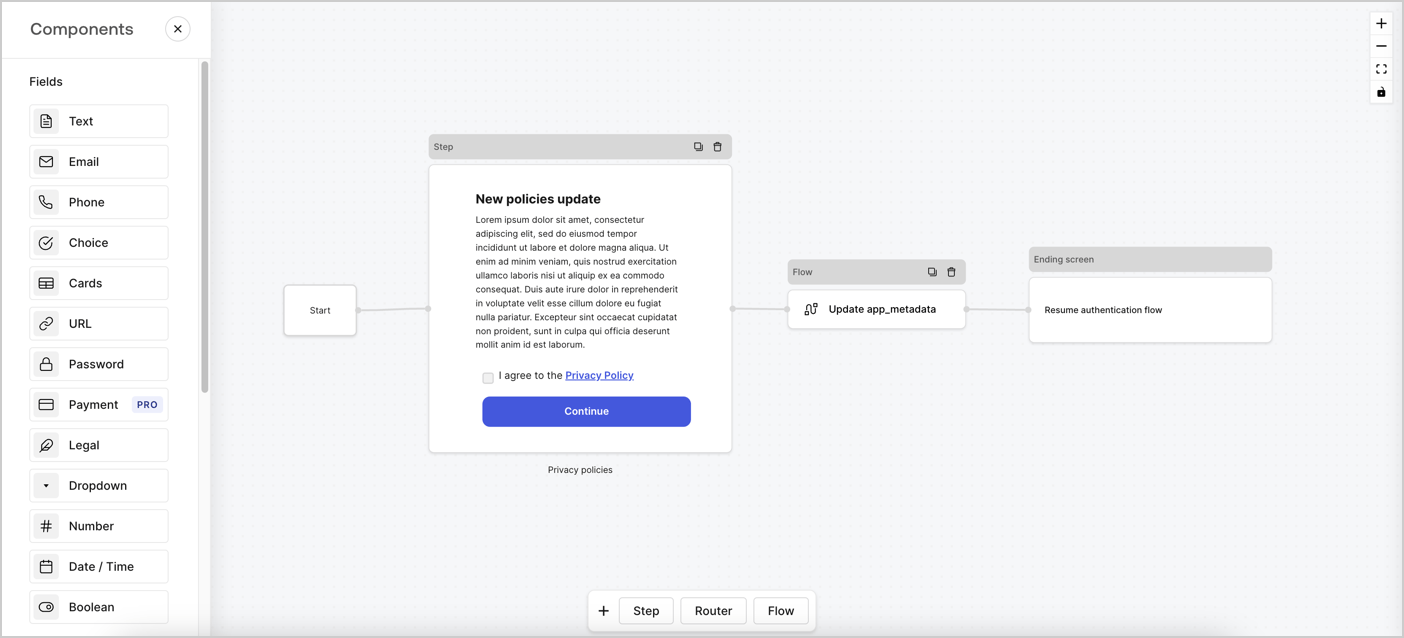
Forms for Actions allows you to create custom privacy policies flows and store the consent under the `app_metadata` object.
<Frame>
  <img src="https://mintcdn.com/docs-staging-feat-docs-5417-afc/W4rC8fCCcSNfQxr9/docs/images/cdy7uua7fh8z/6i68dMvHDTijfRmSgN1x8Q/ad900e7d4c0fb34645921435472b8684/privavy-policy-form.png?fit=max&auto=format&n=W4rC8fCCcSNfQxr9&q=85&s=58fff199be3633b9485e11640bf391ba" alt="Dashboard > Actions > Forms > Privacy policy use case" data-og-width="1404" width="1404" data-og-height="638" height="638" data-path="docs/images/cdy7uua7fh8z/6i68dMvHDTijfRmSgN1x8Q/ad900e7d4c0fb34645921435472b8684/privavy-policy-form.png" data-optimize="true" data-opv="3" srcset="https://mintcdn.com/docs-staging-feat-docs-5417-afc/W4rC8fCCcSNfQxr9/docs/images/cdy7uua7fh8z/6i68dMvHDTijfRmSgN1x8Q/ad900e7d4c0fb34645921435472b8684/privavy-policy-form.png?w=280&fit=max&auto=format&n=W4rC8fCCcSNfQxr9&q=85&s=b31449ea83364ac249c47884aa10390c 280w, https://mintcdn.com/docs-staging-feat-docs-5417-afc/W4rC8fCCcSNfQxr9/docs/images/cdy7uua7fh8z/6i68dMvHDTijfRmSgN1x8Q/ad900e7d4c0fb34645921435472b8684/privavy-policy-form.png?w=560&fit=max&auto=format&n=W4rC8fCCcSNfQxr9&q=85&s=836c97675d3508189b425fb480e011a6 560w, https://mintcdn.com/docs-staging-feat-docs-5417-afc/W4rC8fCCcSNfQxr9/docs/images/cdy7uua7fh8z/6i68dMvHDTijfRmSgN1x8Q/ad900e7d4c0fb34645921435472b8684/privavy-policy-form.png?w=840&fit=max&auto=format&n=W4rC8fCCcSNfQxr9&q=85&s=0c339a9d98d57c06d5a1c5f7a7e3a1cc 840w, https://mintcdn.com/docs-staging-feat-docs-5417-afc/W4rC8fCCcSNfQxr9/docs/images/cdy7uua7fh8z/6i68dMvHDTijfRmSgN1x8Q/ad900e7d4c0fb34645921435472b8684/privavy-policy-form.png?w=1100&fit=max&auto=format&n=W4rC8fCCcSNfQxr9&q=85&s=02d60516437d59b085bcd7c24e4c0ac2 1100w, https://mintcdn.com/docs-staging-feat-docs-5417-afc/W4rC8fCCcSNfQxr9/docs/images/cdy7uua7fh8z/6i68dMvHDTijfRmSgN1x8Q/ad900e7d4c0fb34645921435472b8684/privavy-policy-form.png?w=1650&fit=max&auto=format&n=W4rC8fCCcSNfQxr9&q=85&s=144d67de0a6b1aeccc482f6dd8ddc995 1650w, https://mintcdn.com/docs-staging-feat-docs-5417-afc/W4rC8fCCcSNfQxr9/docs/images/cdy7uua7fh8z/6i68dMvHDTijfRmSgN1x8Q/ad900e7d4c0fb34645921435472b8684/privavy-policy-form.png?w=2500&fit=max&auto=format&n=W4rC8fCCcSNfQxr9&q=85&s=bc120abda8a41e1549a71d245bf5c582 2500w" />
</Frame>

The sections below outline how you can create an Update Policy form using nodes and flows, along with steps for adding your form to a [Post Login](/docs/customize/actions/explore-triggers/signup-and-login-triggers/login-trigger) Action.

## Create a form from scratch

Follow these steps to create a form to gather information:

1. Open the Form editor by selecting **Auth0 Dashboard > Actions > Forms.**
2. Select **Create Form** > **Start from scratch**.

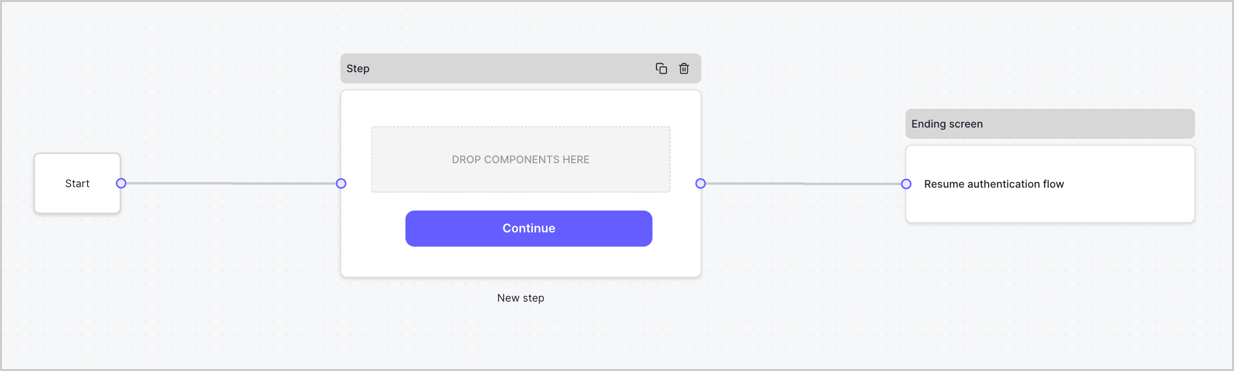
By default, a new form contains a Start node, a Step node, and an Ending screen node.
<Frame>
  <img src="https://mintcdn.com/docs-staging-feat-docs-5417-afc/4dxuhuT8jSnTfCAG/docs/images/cdy7uua7fh8z/2TZ9jSjgEcARFpULI6hz4R/a4319a1bd482f2ee5cc23100fdb2f42c/New-form-Forms-for-action-use-case.png?fit=max&auto=format&n=4dxuhuT8jSnTfCAG&q=85&s=f896c85b3e80ceab675ad2924bb43d4b" alt="Dashboard > Forms > Use Cases > Form" data-og-width="1234" width="1234" data-og-height="371" height="371" data-path="docs/images/cdy7uua7fh8z/2TZ9jSjgEcARFpULI6hz4R/a4319a1bd482f2ee5cc23100fdb2f42c/New-form-Forms-for-action-use-case.png" data-optimize="true" data-opv="3" srcset="https://mintcdn.com/docs-staging-feat-docs-5417-afc/4dxuhuT8jSnTfCAG/docs/images/cdy7uua7fh8z/2TZ9jSjgEcARFpULI6hz4R/a4319a1bd482f2ee5cc23100fdb2f42c/New-form-Forms-for-action-use-case.png?w=280&fit=max&auto=format&n=4dxuhuT8jSnTfCAG&q=85&s=9aafaa9a350f17bfb409a80c967e95e8 280w, https://mintcdn.com/docs-staging-feat-docs-5417-afc/4dxuhuT8jSnTfCAG/docs/images/cdy7uua7fh8z/2TZ9jSjgEcARFpULI6hz4R/a4319a1bd482f2ee5cc23100fdb2f42c/New-form-Forms-for-action-use-case.png?w=560&fit=max&auto=format&n=4dxuhuT8jSnTfCAG&q=85&s=a3359c56f20579a5bd8257b8cb065c60 560w, https://mintcdn.com/docs-staging-feat-docs-5417-afc/4dxuhuT8jSnTfCAG/docs/images/cdy7uua7fh8z/2TZ9jSjgEcARFpULI6hz4R/a4319a1bd482f2ee5cc23100fdb2f42c/New-form-Forms-for-action-use-case.png?w=840&fit=max&auto=format&n=4dxuhuT8jSnTfCAG&q=85&s=abc35b912f318a61a40f87569f841026 840w, https://mintcdn.com/docs-staging-feat-docs-5417-afc/4dxuhuT8jSnTfCAG/docs/images/cdy7uua7fh8z/2TZ9jSjgEcARFpULI6hz4R/a4319a1bd482f2ee5cc23100fdb2f42c/New-form-Forms-for-action-use-case.png?w=1100&fit=max&auto=format&n=4dxuhuT8jSnTfCAG&q=85&s=d6dff5f13f007d8952f736cf3b775192 1100w, https://mintcdn.com/docs-staging-feat-docs-5417-afc/4dxuhuT8jSnTfCAG/docs/images/cdy7uua7fh8z/2TZ9jSjgEcARFpULI6hz4R/a4319a1bd482f2ee5cc23100fdb2f42c/New-form-Forms-for-action-use-case.png?w=1650&fit=max&auto=format&n=4dxuhuT8jSnTfCAG&q=85&s=11610eb9eabd579356627da7298e1231 1650w, https://mintcdn.com/docs-staging-feat-docs-5417-afc/4dxuhuT8jSnTfCAG/docs/images/cdy7uua7fh8z/2TZ9jSjgEcARFpULI6hz4R/a4319a1bd482f2ee5cc23100fdb2f42c/New-form-Forms-for-action-use-case.png?w=2500&fit=max&auto=format&n=4dxuhuT8jSnTfCAG&q=85&s=856d95ee08b9c152381d2928abb7a1b3 2500w" />
</Frame>

### Configure the Step node

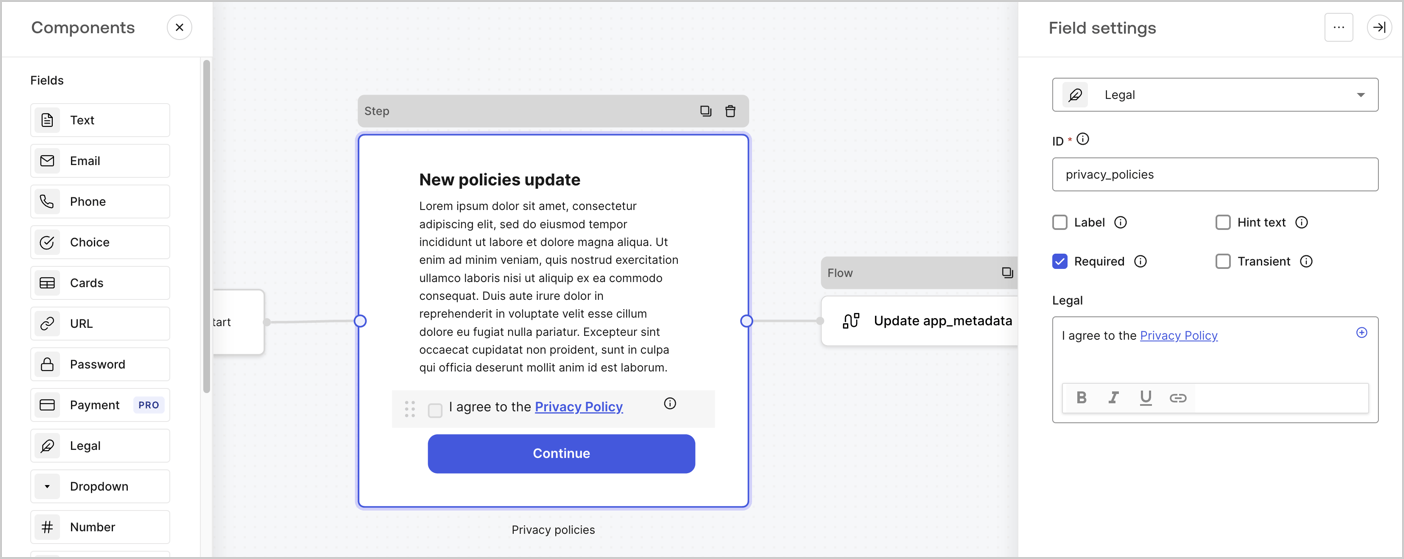
The Step node is the graphical interface visible to users. Add [Fields](/docs/customize/forms/nodes-and-components) to the Step node to collect the new agreement acceptance value by following these steps:

1. Drag a **Rich text** field from the **Components menu** into the **Step** node.

   * **Rich text**: Enter a description of your privacy policies updates.
   * Select **Save**.
2. Drag a **Legal** field into the **Step** node.

   * **ID**: Enter `privacy_policies`.
   * **Required**: Enable the checkbox.
   * **Legal**: Enter `I agree to the Privacy Policy`.
   * Select **Save**.
3. Select **Publish** to save.
<Frame>
  <img src="https://mintcdn.com/docs-staging-feat-docs-5417-afc/Gbm7jk_RmvK_EMrZ/docs/images/cdy7uua7fh8z/59zFFjQjAnjogkc2QGIqqJ/0ad66b1b636544122aa4e65968b76c2c/privacy-policy-step-node.png?fit=max&auto=format&n=Gbm7jk_RmvK_EMrZ&q=85&s=89c6a526028c5211af8a1c8c6c572b2d" alt="Dashboard > Actions > Forms > Use case privacy policy step node" data-og-width="1404" width="1404" data-og-height="559" height="559" data-path="docs/images/cdy7uua7fh8z/59zFFjQjAnjogkc2QGIqqJ/0ad66b1b636544122aa4e65968b76c2c/privacy-policy-step-node.png" data-optimize="true" data-opv="3" srcset="https://mintcdn.com/docs-staging-feat-docs-5417-afc/Gbm7jk_RmvK_EMrZ/docs/images/cdy7uua7fh8z/59zFFjQjAnjogkc2QGIqqJ/0ad66b1b636544122aa4e65968b76c2c/privacy-policy-step-node.png?w=280&fit=max&auto=format&n=Gbm7jk_RmvK_EMrZ&q=85&s=be03ae04616505810467cddbeef129e9 280w, https://mintcdn.com/docs-staging-feat-docs-5417-afc/Gbm7jk_RmvK_EMrZ/docs/images/cdy7uua7fh8z/59zFFjQjAnjogkc2QGIqqJ/0ad66b1b636544122aa4e65968b76c2c/privacy-policy-step-node.png?w=560&fit=max&auto=format&n=Gbm7jk_RmvK_EMrZ&q=85&s=3f5b12d54071d3f7bddf6523a1d7c3bd 560w, https://mintcdn.com/docs-staging-feat-docs-5417-afc/Gbm7jk_RmvK_EMrZ/docs/images/cdy7uua7fh8z/59zFFjQjAnjogkc2QGIqqJ/0ad66b1b636544122aa4e65968b76c2c/privacy-policy-step-node.png?w=840&fit=max&auto=format&n=Gbm7jk_RmvK_EMrZ&q=85&s=585a37d2f05b77fa4ce3f313f318fd48 840w, https://mintcdn.com/docs-staging-feat-docs-5417-afc/Gbm7jk_RmvK_EMrZ/docs/images/cdy7uua7fh8z/59zFFjQjAnjogkc2QGIqqJ/0ad66b1b636544122aa4e65968b76c2c/privacy-policy-step-node.png?w=1100&fit=max&auto=format&n=Gbm7jk_RmvK_EMrZ&q=85&s=8578ea973a89a3af93513b5c9232f743 1100w, https://mintcdn.com/docs-staging-feat-docs-5417-afc/Gbm7jk_RmvK_EMrZ/docs/images/cdy7uua7fh8z/59zFFjQjAnjogkc2QGIqqJ/0ad66b1b636544122aa4e65968b76c2c/privacy-policy-step-node.png?w=1650&fit=max&auto=format&n=Gbm7jk_RmvK_EMrZ&q=85&s=8acf1ff590dde29820116a6ba7cb8dcd 1650w, https://mintcdn.com/docs-staging-feat-docs-5417-afc/Gbm7jk_RmvK_EMrZ/docs/images/cdy7uua7fh8z/59zFFjQjAnjogkc2QGIqqJ/0ad66b1b636544122aa4e65968b76c2c/privacy-policy-step-node.png?w=2500&fit=max&auto=format&n=Gbm7jk_RmvK_EMrZ&q=85&s=9123dba62d91c3884097dfc85a9d8059 2500w" />
</Frame>

### Configure the Flow node

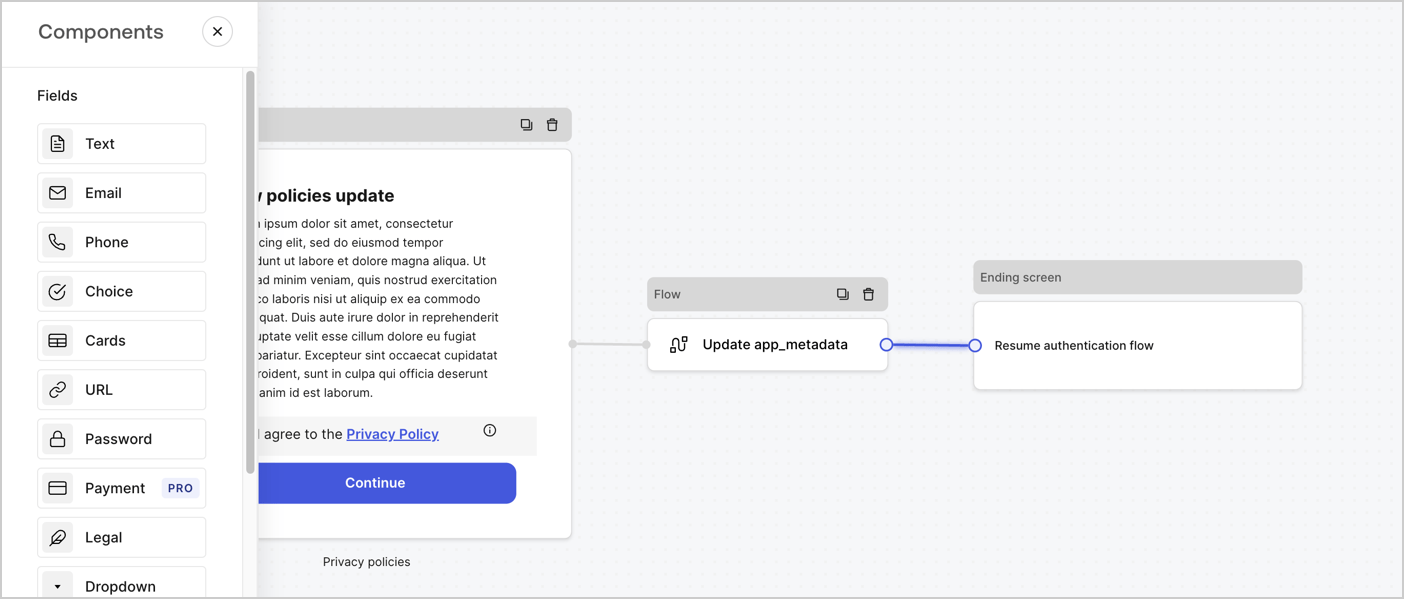
Add a **Flow** node after the **Step** node to update the `app_metadata` and resume the authentication flow by following these steps:

1. Select **Flow** from the bottom of the Form editor.
2. Remove the existing link between the **Step** and **Ending Screen** nodes.
3. Select the new **Flow** > **Click to add a flow** > **Create a new flow.**

   * Enter `Update app_metadata` in the **Name** field.
   * Select **Create**.
   * Select **Save**.
4. Link the **Flow** node to the **Step** and **Ending Screen** nodes as pictured below.
5. Select **Publish** to save.
<Frame>
  <img src="https://mintcdn.com/docs-staging-feat-docs-5417-afc/W4rC8fCCcSNfQxr9/docs/images/cdy7uua7fh8z/6YIkzm7SrpM9LW76AXuRzh/353c518fe82bbaa440836da1d83596d6/link-policies.png?fit=max&auto=format&n=W4rC8fCCcSNfQxr9&q=85&s=b5460740cac250ae8bf3177f7a981cdc" alt="Dashboard > Actions > Forms > Form" data-og-width="1404" width="1404" data-og-height="599" height="599" data-path="docs/images/cdy7uua7fh8z/6YIkzm7SrpM9LW76AXuRzh/353c518fe82bbaa440836da1d83596d6/link-policies.png" data-optimize="true" data-opv="3" srcset="https://mintcdn.com/docs-staging-feat-docs-5417-afc/W4rC8fCCcSNfQxr9/docs/images/cdy7uua7fh8z/6YIkzm7SrpM9LW76AXuRzh/353c518fe82bbaa440836da1d83596d6/link-policies.png?w=280&fit=max&auto=format&n=W4rC8fCCcSNfQxr9&q=85&s=603c1fb3098e23cd6785646cbcbb4455 280w, https://mintcdn.com/docs-staging-feat-docs-5417-afc/W4rC8fCCcSNfQxr9/docs/images/cdy7uua7fh8z/6YIkzm7SrpM9LW76AXuRzh/353c518fe82bbaa440836da1d83596d6/link-policies.png?w=560&fit=max&auto=format&n=W4rC8fCCcSNfQxr9&q=85&s=d6e82d98d0f1b1afdf66ad0a3e620b8c 560w, https://mintcdn.com/docs-staging-feat-docs-5417-afc/W4rC8fCCcSNfQxr9/docs/images/cdy7uua7fh8z/6YIkzm7SrpM9LW76AXuRzh/353c518fe82bbaa440836da1d83596d6/link-policies.png?w=840&fit=max&auto=format&n=W4rC8fCCcSNfQxr9&q=85&s=9a38abadf43ea0930de71420ab47e10a 840w, https://mintcdn.com/docs-staging-feat-docs-5417-afc/W4rC8fCCcSNfQxr9/docs/images/cdy7uua7fh8z/6YIkzm7SrpM9LW76AXuRzh/353c518fe82bbaa440836da1d83596d6/link-policies.png?w=1100&fit=max&auto=format&n=W4rC8fCCcSNfQxr9&q=85&s=cbf414df1737590603004d04e855383e 1100w, https://mintcdn.com/docs-staging-feat-docs-5417-afc/W4rC8fCCcSNfQxr9/docs/images/cdy7uua7fh8z/6YIkzm7SrpM9LW76AXuRzh/353c518fe82bbaa440836da1d83596d6/link-policies.png?w=1650&fit=max&auto=format&n=W4rC8fCCcSNfQxr9&q=85&s=4caa9f4ad0f0cf95325d926db28336e0 1650w, https://mintcdn.com/docs-staging-feat-docs-5417-afc/W4rC8fCCcSNfQxr9/docs/images/cdy7uua7fh8z/6YIkzm7SrpM9LW76AXuRzh/353c518fe82bbaa440836da1d83596d6/link-policies.png?w=2500&fit=max&auto=format&n=W4rC8fCCcSNfQxr9&q=85&s=0a9c18d46488227ee7cb9aed84efb398 2500w" />
</Frame>

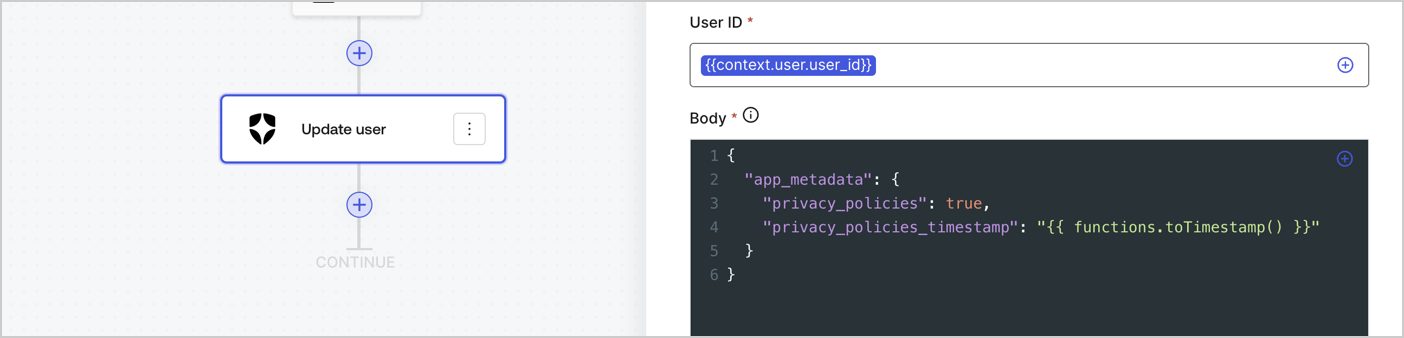
Add an Auth0 Update user action to the flow by following these steps:

1. Select the **Flow** **Update app\_metadata** > **Edit flow** to open the Flow editor in a new tab.
2. Below the StartAction, select the **+** icon to add an **Update user** action. Complete the fields below, then select **Save** to continue.

   * **Connection**: Select from the dropdown the Vault connection to your M2M application.

   * **User ID**: Enter `{{context.user.user_id}}`.

   * **Body**: Copy and paste the following code to update the app\_metadata with the privacy\_policies and privacy\_policies\_timestamp properties.

     ```text lines theme={null}
     {
       "app_metadata": {
         "privacy_policies": true,
         "privacy_policies_timestamp": "{{ functions.toTimestamp() }}"
       }
     }
     ```

   * Select **Save**.
3. Select **Publish** to save.
<Frame>
  <img src="https://mintcdn.com/docs-staging-feat-docs-5417-afc/w32cGJwxvUvOQVTE/docs/images/cdy7uua7fh8z/CvMNIwWrOUwaFW4X3G28p/1fb70ae57a20749d9ffaaba8dc0b7e26/update-user-privacy.png?fit=max&auto=format&n=w32cGJwxvUvOQVTE&q=85&s=995ce1edc8c429719508c06611dd4d5a" alt="Dashboard > Actions > Forms > User case privacy policy code" data-og-width="1404" width="1404" data-og-height="338" height="338" data-path="docs/images/cdy7uua7fh8z/CvMNIwWrOUwaFW4X3G28p/1fb70ae57a20749d9ffaaba8dc0b7e26/update-user-privacy.png" data-optimize="true" data-opv="3" srcset="https://mintcdn.com/docs-staging-feat-docs-5417-afc/w32cGJwxvUvOQVTE/docs/images/cdy7uua7fh8z/CvMNIwWrOUwaFW4X3G28p/1fb70ae57a20749d9ffaaba8dc0b7e26/update-user-privacy.png?w=280&fit=max&auto=format&n=w32cGJwxvUvOQVTE&q=85&s=72fc50a375ceb0dc81fc8362cffab325 280w, https://mintcdn.com/docs-staging-feat-docs-5417-afc/w32cGJwxvUvOQVTE/docs/images/cdy7uua7fh8z/CvMNIwWrOUwaFW4X3G28p/1fb70ae57a20749d9ffaaba8dc0b7e26/update-user-privacy.png?w=560&fit=max&auto=format&n=w32cGJwxvUvOQVTE&q=85&s=833993a30fe2e1f961e43ca52f5331f3 560w, https://mintcdn.com/docs-staging-feat-docs-5417-afc/w32cGJwxvUvOQVTE/docs/images/cdy7uua7fh8z/CvMNIwWrOUwaFW4X3G28p/1fb70ae57a20749d9ffaaba8dc0b7e26/update-user-privacy.png?w=840&fit=max&auto=format&n=w32cGJwxvUvOQVTE&q=85&s=092727d6d8b6fe256367c93c4fc5064b 840w, https://mintcdn.com/docs-staging-feat-docs-5417-afc/w32cGJwxvUvOQVTE/docs/images/cdy7uua7fh8z/CvMNIwWrOUwaFW4X3G28p/1fb70ae57a20749d9ffaaba8dc0b7e26/update-user-privacy.png?w=1100&fit=max&auto=format&n=w32cGJwxvUvOQVTE&q=85&s=d3c45fd843ed62d2624a14efb5562d07 1100w, https://mintcdn.com/docs-staging-feat-docs-5417-afc/w32cGJwxvUvOQVTE/docs/images/cdy7uua7fh8z/CvMNIwWrOUwaFW4X3G28p/1fb70ae57a20749d9ffaaba8dc0b7e26/update-user-privacy.png?w=1650&fit=max&auto=format&n=w32cGJwxvUvOQVTE&q=85&s=03521971dd58180487cb1183df816b89 1650w, https://mintcdn.com/docs-staging-feat-docs-5417-afc/w32cGJwxvUvOQVTE/docs/images/cdy7uua7fh8z/CvMNIwWrOUwaFW4X3G28p/1fb70ae57a20749d9ffaaba8dc0b7e26/update-user-privacy.png?w=2500&fit=max&auto=format&n=w32cGJwxvUvOQVTE&q=85&s=246cc227efe00021f047bd0764a18d44 2500w" />
</Frame>

<Callout icon="file-lines" color="#0EA5E9" iconType="regular">
  The flow **Update app\_metadata** adds a `privacy_policies true` value to the app`_metadata` object and also generates a timestamp with a [helper function.](/docs/customize/forms/variables)
</Callout>

## Retrieve the form render code

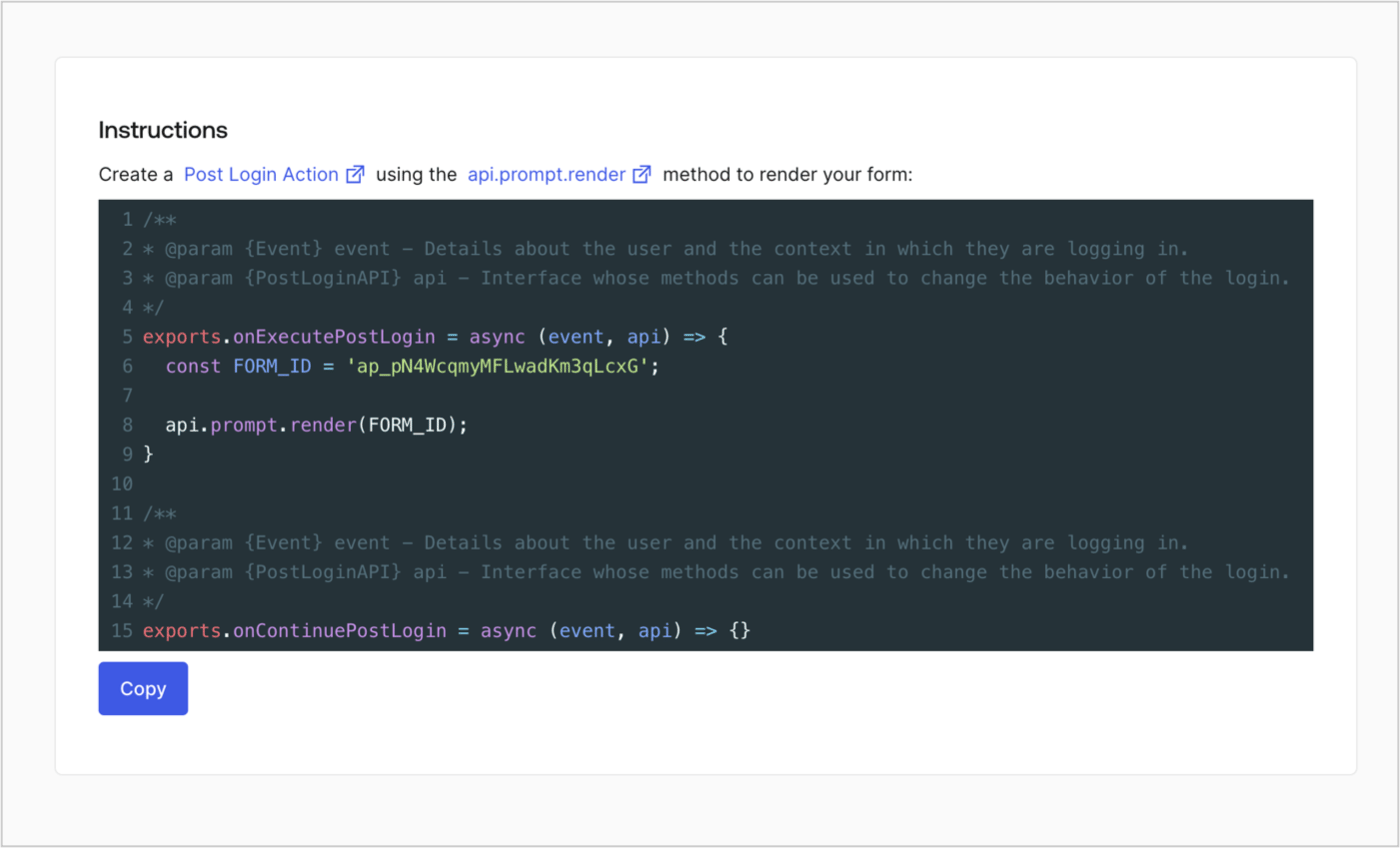
Retrieve your form render code to visually render the form with a custom Post Login Action by following these steps:

* From the Form editor, select **`<> Render`**.
* Select **Copy**.
<Frame>
  <img src="https://mintcdn.com/docs-staging-feat-docs-5417-afc/pYx02zIwdLgyxxey/docs/images/cdy7uua7fh8z/2EIUzc539sq9lwoTKbjoJv/496a864c0fc44a782c9cadca119dbfb0/embed.png?fit=max&auto=format&n=pYx02zIwdLgyxxey&q=85&s=93f03106ca18841a5af69879ce268af0" alt="Dashboard > Actions > Forms > Form > Embed" data-og-width="1400" width="1400" data-og-height="848" height="848" data-path="docs/images/cdy7uua7fh8z/2EIUzc539sq9lwoTKbjoJv/496a864c0fc44a782c9cadca119dbfb0/embed.png" data-optimize="true" data-opv="3" srcset="https://mintcdn.com/docs-staging-feat-docs-5417-afc/pYx02zIwdLgyxxey/docs/images/cdy7uua7fh8z/2EIUzc539sq9lwoTKbjoJv/496a864c0fc44a782c9cadca119dbfb0/embed.png?w=280&fit=max&auto=format&n=pYx02zIwdLgyxxey&q=85&s=6641db28a61456fce25958f62c9f03be 280w, https://mintcdn.com/docs-staging-feat-docs-5417-afc/pYx02zIwdLgyxxey/docs/images/cdy7uua7fh8z/2EIUzc539sq9lwoTKbjoJv/496a864c0fc44a782c9cadca119dbfb0/embed.png?w=560&fit=max&auto=format&n=pYx02zIwdLgyxxey&q=85&s=eaf1768e96bdffd073b64db1fe773561 560w, https://mintcdn.com/docs-staging-feat-docs-5417-afc/pYx02zIwdLgyxxey/docs/images/cdy7uua7fh8z/2EIUzc539sq9lwoTKbjoJv/496a864c0fc44a782c9cadca119dbfb0/embed.png?w=840&fit=max&auto=format&n=pYx02zIwdLgyxxey&q=85&s=62a6b31646fd967706bb939cc0a86948 840w, https://mintcdn.com/docs-staging-feat-docs-5417-afc/pYx02zIwdLgyxxey/docs/images/cdy7uua7fh8z/2EIUzc539sq9lwoTKbjoJv/496a864c0fc44a782c9cadca119dbfb0/embed.png?w=1100&fit=max&auto=format&n=pYx02zIwdLgyxxey&q=85&s=9e2e52c688077f036b0c5fe2d748f564 1100w, https://mintcdn.com/docs-staging-feat-docs-5417-afc/pYx02zIwdLgyxxey/docs/images/cdy7uua7fh8z/2EIUzc539sq9lwoTKbjoJv/496a864c0fc44a782c9cadca119dbfb0/embed.png?w=1650&fit=max&auto=format&n=pYx02zIwdLgyxxey&q=85&s=bfc91d8543adb4e8b2e76ed2e078eaf3 1650w, https://mintcdn.com/docs-staging-feat-docs-5417-afc/pYx02zIwdLgyxxey/docs/images/cdy7uua7fh8z/2EIUzc539sq9lwoTKbjoJv/496a864c0fc44a782c9cadca119dbfb0/embed.png?w=2500&fit=max&auto=format&n=pYx02zIwdLgyxxey&q=85&s=32e5c8521bedbe99eefa43b3dc0ceb11 2500w" />
</Frame>

## Create a Post Login Action

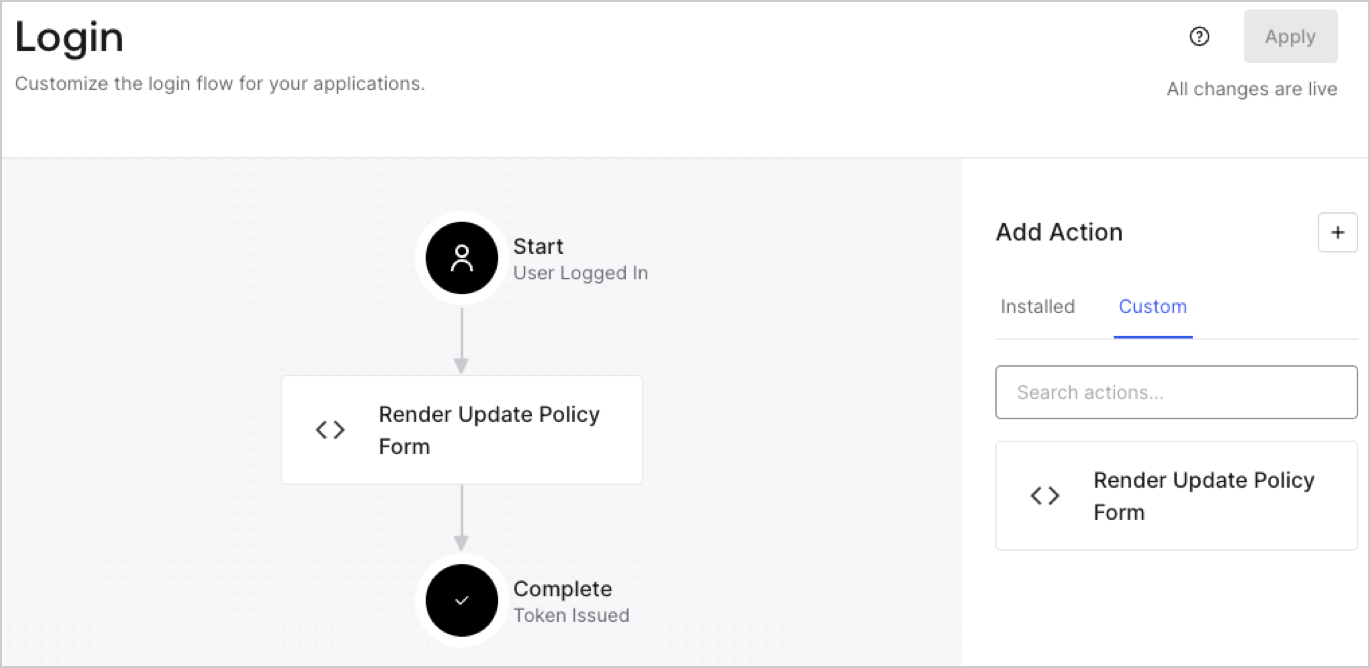
Create a post-login Action to render your form by following these steps:

1. Navigate to **Auth0 Dashboard > Actions > Flows > Login.**
2. Select the **+** icon and Select **Build from scratch**:

   * **Name**: Enter `Render Update Policy Form`.
   * **Trigger**: Select `Login / Post Login`.
   * **Runtime**: Select the recommended version.
3. Select **Create**.

To configure the post-login Action:

1. Delete the existing code from the Code editor.
2. Paste the form render code into the Code editor.
3. Edit the code to define the conditional logic that will render the form.

   ```javascript lines theme={null}
   /**
   * @param {Event} event - Details about the user and the context in which they are logging in.
   * @param {PostLoginAPI} api - Interface whose methods can be used to change the behavior of the login.
   */
   exports.onExecutePostLogin = async (event, api) => {
     const FORM_ID = 'REPLACE_WITH_YOUR_FORM_ID';

     if (event.user.app_metadata.privacy_policies !== true) {
       api.prompt.render(FORM_ID);
     }
   }

   exports.onContinuePostLogin = async (event, api) => { }
   ```

   <Callout icon="file-lines" color="#0EA5E9" iconType="regular">
     The example code above will render the form when a user is missing the app metadata `privacy_policies` property.
   </Callout>
4. Select **Deploy.**
5. Drag and Drop the **Render Update Policy Form** Action to the **Login** flow.
   <Frame>
     <img src="https://mintcdn.com/docs-staging-feat-docs-5417-afc/mOQrYypycN5Taaj8/docs/images/cdy7uua7fh8z/5TOwDgevZsBqd7yZynUYWU/41ca909dc3007aed4f40ff794a05efa5/postlogin.png?fit=max&auto=format&n=mOQrYypycN5Taaj8&q=85&s=7e2ece6e13dfe40ed02367df716c6984" alt="Dashboard > Forms > Use Case > Render update policy form login action" data-og-width="1370" width="1370" data-og-height="668" height="668" data-path="docs/images/cdy7uua7fh8z/5TOwDgevZsBqd7yZynUYWU/41ca909dc3007aed4f40ff794a05efa5/postlogin.png" data-optimize="true" data-opv="3" srcset="https://mintcdn.com/docs-staging-feat-docs-5417-afc/mOQrYypycN5Taaj8/docs/images/cdy7uua7fh8z/5TOwDgevZsBqd7yZynUYWU/41ca909dc3007aed4f40ff794a05efa5/postlogin.png?w=280&fit=max&auto=format&n=mOQrYypycN5Taaj8&q=85&s=fd4afda7885c222977bf0fe6bd40d7c2 280w, https://mintcdn.com/docs-staging-feat-docs-5417-afc/mOQrYypycN5Taaj8/docs/images/cdy7uua7fh8z/5TOwDgevZsBqd7yZynUYWU/41ca909dc3007aed4f40ff794a05efa5/postlogin.png?w=560&fit=max&auto=format&n=mOQrYypycN5Taaj8&q=85&s=705c030a9e8ab5ce18d8c242529f2333 560w, https://mintcdn.com/docs-staging-feat-docs-5417-afc/mOQrYypycN5Taaj8/docs/images/cdy7uua7fh8z/5TOwDgevZsBqd7yZynUYWU/41ca909dc3007aed4f40ff794a05efa5/postlogin.png?w=840&fit=max&auto=format&n=mOQrYypycN5Taaj8&q=85&s=6f25d7efe6c3ed693afe782e298801ea 840w, https://mintcdn.com/docs-staging-feat-docs-5417-afc/mOQrYypycN5Taaj8/docs/images/cdy7uua7fh8z/5TOwDgevZsBqd7yZynUYWU/41ca909dc3007aed4f40ff794a05efa5/postlogin.png?w=1100&fit=max&auto=format&n=mOQrYypycN5Taaj8&q=85&s=ffc31f09216fdb7a09af7fa5003a85bf 1100w, https://mintcdn.com/docs-staging-feat-docs-5417-afc/mOQrYypycN5Taaj8/docs/images/cdy7uua7fh8z/5TOwDgevZsBqd7yZynUYWU/41ca909dc3007aed4f40ff794a05efa5/postlogin.png?w=1650&fit=max&auto=format&n=mOQrYypycN5Taaj8&q=85&s=e0631cf5de4463bc4f527eed3b71eb4a 1650w, https://mintcdn.com/docs-staging-feat-docs-5417-afc/mOQrYypycN5Taaj8/docs/images/cdy7uua7fh8z/5TOwDgevZsBqd7yZynUYWU/41ca909dc3007aed4f40ff794a05efa5/postlogin.png?w=2500&fit=max&auto=format&n=mOQrYypycN5Taaj8&q=85&s=97743ed0f446676b60a1d2f001f6951a 2500w" />
   </Frame>
6. Select **Apply.**

### Test implementation

Test the implementation by following these steps:

1. Log in with an existing user whose app`_metadata` attribute `privacy_policies` does not have a value.
2. The post-login Action in the Login flow will render the form and prompt for acceptance.
3. Select **Auth0 Dashboard > User Management > Users,** locate the user and verify that the `app_metadata` attribute `privacy_policies` contains a `true` value and a timestamp.
